


Some engineering tasks are too repetitive to be worth prompting every time by hand, but too fuzzy for a script.
We've been using Scouts at PostHog to do these instead – scheduled agents with long-term memory that run on a cron trigger.1
Here are 6 chores we’ve automated this way, with prompts you can copy to build your own version of each.
1. Validating small fixes in prod
Everyone's merging more code than ever. And the smaller the PR, the more annoying it is to stop what you’re doing to check it in prod – especially if you already did that in dev.
Take this agent-generated string length limit fix that Andy Maguire from our self-driving team merged. It's a tiny change that takes more effort to validate than to push: he'd have to check back for when it hits prod, open error logs, and verify traffic is still flowing.
Instead, Andy queued it to merge at 09:19 UTC and moved on to other tasks. It reached prod about an hour later, and the next morning a scheduled agent confirmed the fix held across 200K sandbox-creation log lines using a prompt similar to our PR follow-up skill.
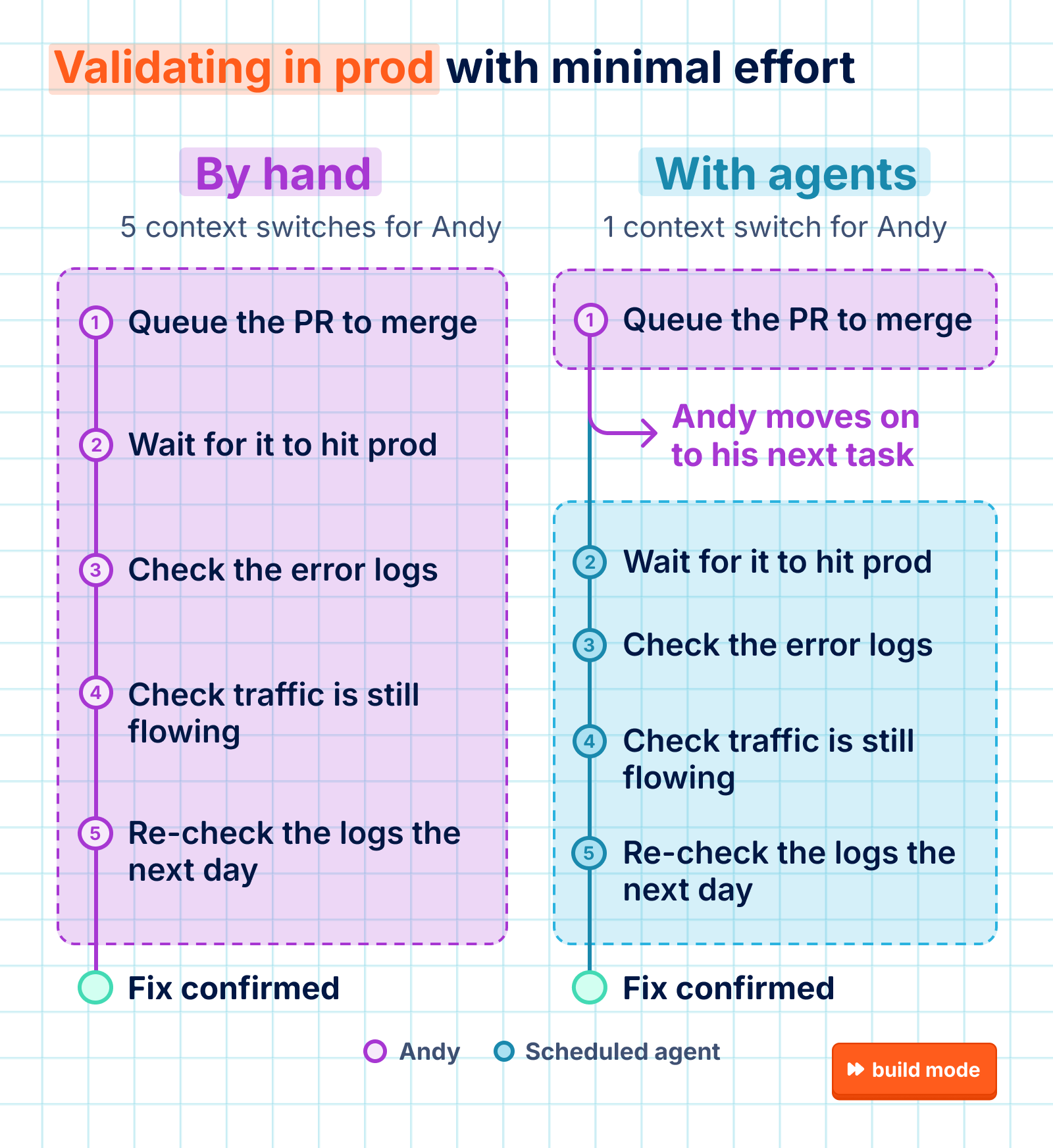
It's even more useful in the opposite case. One time, an agent fixed an error that looked like it came from our browser SDK, affecting about 45k users a week. A later validation report showed the error was firing more than before from our Node SDK, which has its own copy of the same utility – exactly the kind of thing a human might not have remembered to check.
Steal this prompt:
Read https://github.com/PostHog/posthog/blob/master/products/signals/skills/signals-scout-pr-follow-up/SKILL.md and build the equivalent as a scheduled agent for my stack.

Ask me where my deploys, logs, and errors live and where reports should go before writing anything.
2. Capturing feature requests
We use agents to find recurring themes in user feedback from in-app surveys, support tickets, Discord, Gong, and Slack. A lesson we recently re-learned was the importance of prioritizing that feedback.
When our sales team set up a scheduled agent to post to #feature-request-feed, Raquel from our Blitzscale team said that these automations had been less than useful in her experience:
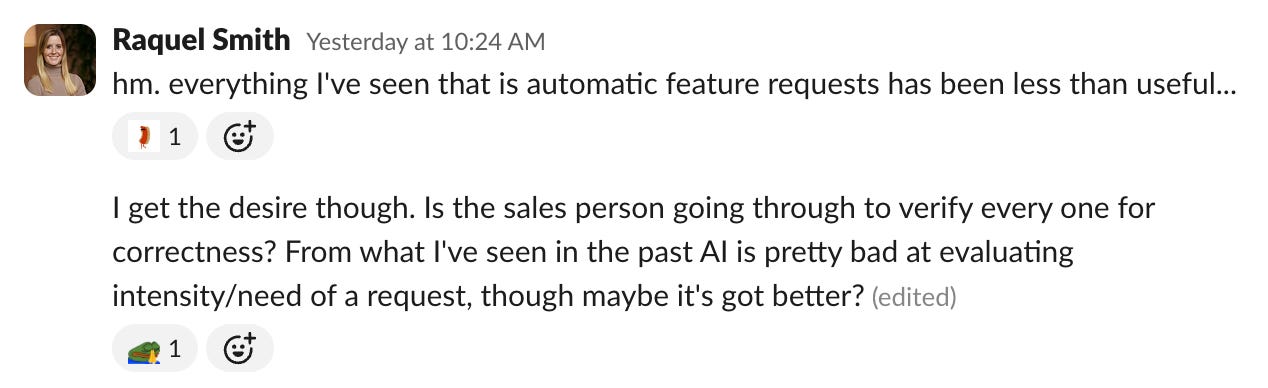
Tyler Crandall, the TAM who created the feed, updated the prompts to factor in urgency. Each one now gets rated based on the call transcript and customer history, which makes up for the facial expressions and voice cues we'd rely on if we did this manually. Plus, the agent can reference its own ratings as context for future runs, too:
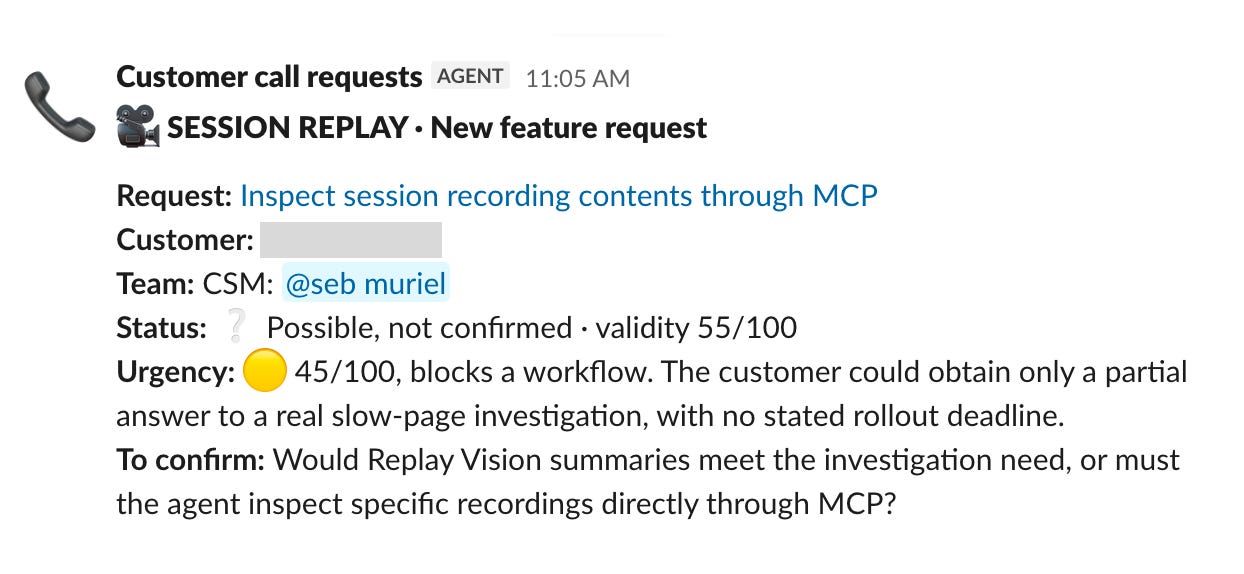
Steal this prompt:
Set up a scheduled agent that runs every weekday morning and pulls feature requests from yesterday's customer calls and Slack channels. Count only what customers said, and skip anything an existing feature already solves.

Log each request with the problem, the ask, a verbatim quote, and a link. Score urgency 0–100 from the customer's own words, not account size, with one sentence of evidence.

Ask me where transcripts and channels live before writing anything.
3. Adding event tracking
There are times where even we forget to add instrumentation for product analytics. We added a rule in our AGENTS.md to make AI do this for us moving forward, but we also have a scheduled agent that catches gaps retroactively.
It works through recently merged PRs and looks for user-facing actions that are missing event tracking. When it finds one, it cross-checks our live PostHog data to confirm the event never fires, and then files a report with a fix. A coding agent then picks up that report and opens a PR to add the instrumentation.
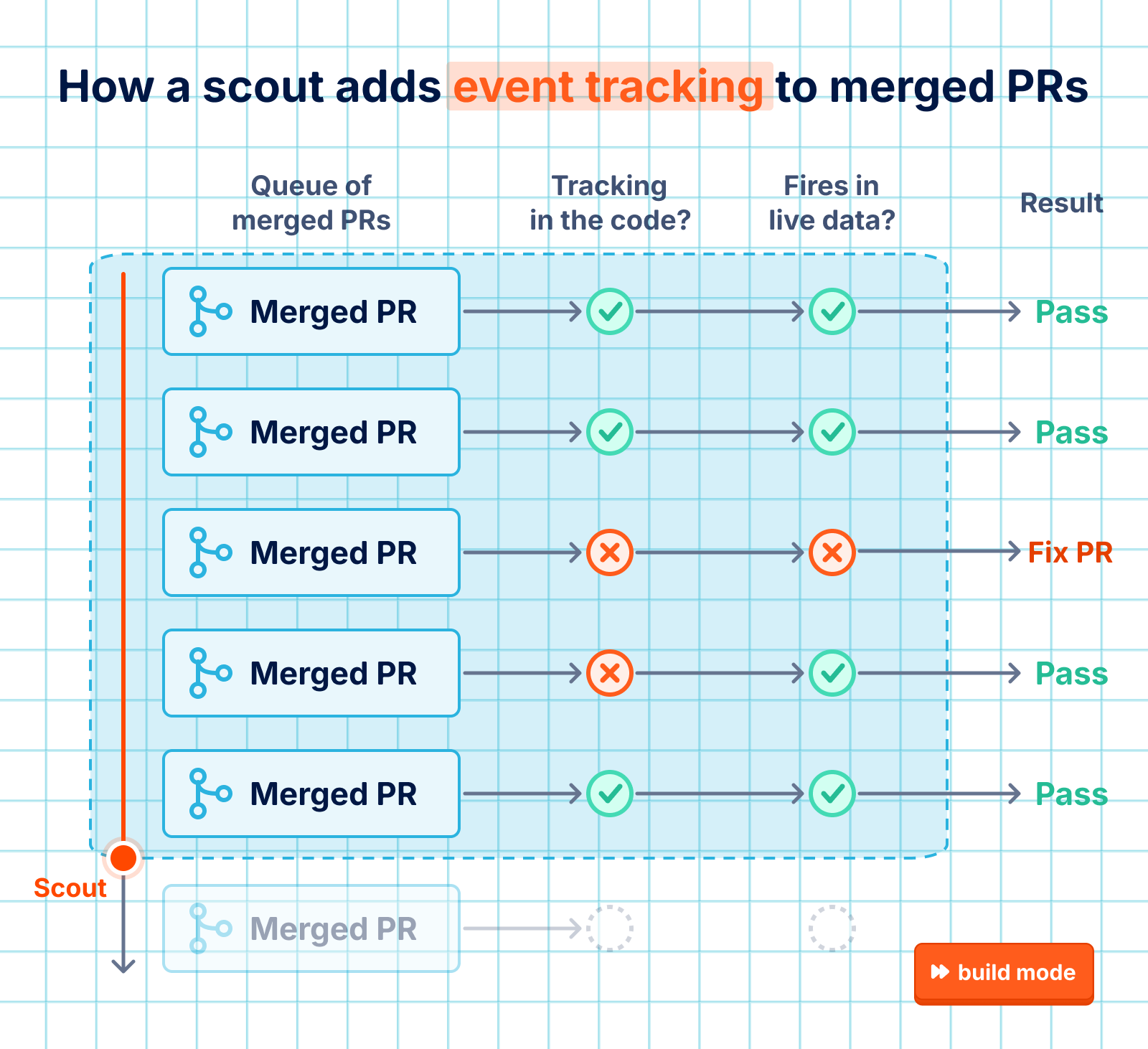
It's useful to have a separate agent doing the actual implementation work. The scheduled agent's original report recommended adding 2 different capture calls in the frontend for this PR. The coding agent, which has more specialized context, found that multiple sources (including MCP and API callers) sent the same request. It chose a better pattern to instrument these as a single capture on server-side, with session IDs and access method.
Steal this prompt:
Set up a scheduled agent that runs daily and checks recently merged PRs for new user actions shipped without analytics tracking – like a signup, an export, or a server-side API call. Confirm each gap against live event data, and skip anything already flagged.

File one report per gap with the file, line, and a fix for a coding agent to implement with this skill: https://github.com/PostHog/ai-plugin/blob/main/skills/instrument-product-analytics/SKILL.md

Ask me where our code, analytics, and reports live before writing anything.
4. Diagnosing flaky tests
Flaky tests are a huge bottleneck for engineers working with AI. They cause intermittent CI failures (usually from hard-to-control factors like timing, shared state, or dependencies). These two were the biggest obstacles slowing down our engineers according to our Q2 internal DevEx survey:
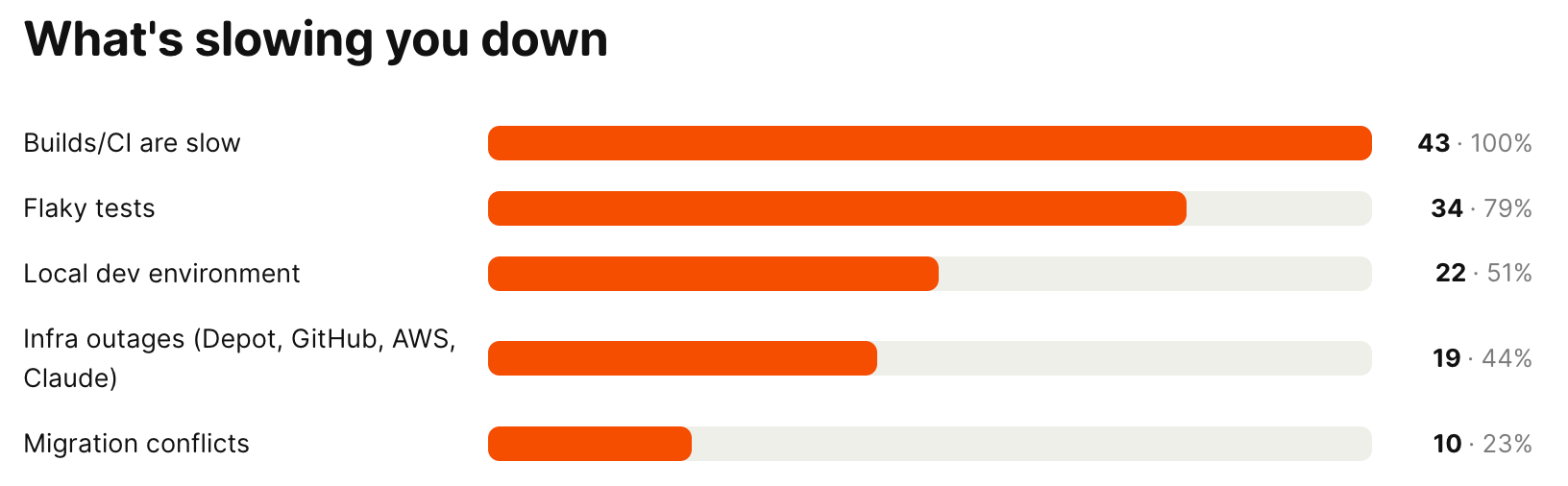
To help with this, we added a scheduled agent that checks for newly quarantined Trunk flaky tests every 3 hours and creates (or updates) reports that are actionable enough to be turned into PRs. Since July, it's filed 72 diagnostic reports, and 11 of those have led to merged fixes like this one, which a coding agent wrote using our skill for fixing flaky tests.
Even though this loop isn't fully automatable, we still consider it a win because it lowers the cost and friction for a human to start a fix. The diagnostic reports are always kept up to date in the background so that anyone can quickly pick one up at any time. And that's way more likely to happen than if our engineers had to start each one from scratch.
Steal this prompt:
Set up a scheduled agent that runs every three hours and checks CI for newly flaky or quarantined tests. Diagnose each one with this skill, but stop at a report instead of a PR: https://github.com/PostHog/posthog/blob/master/.agents/skills/fixing-flaky-tests/SKILL.md

Only report what you can back with source or log evidence, and update an existing report for the same test instead of filing a new one.

Ask me where our CI and flaky-test data live before writing anything.
5. Triaging our own agent feedback
Another type of feedback we take seriously is the responses from our internal coding agents using our dev environment, which we call hogli.
Our monorepo's AGENTS.md instructs agents to use hogli devex:feedback to send a report whenever a hogli command or local dev workflow is broken, slow, or confusing. We have similar systems in place for our PostHog MCP and our AI onboarding wizard.
The problem with all of these is that if you prompt agents to send reports, they'll always try to send something. We already have a few thousand reports written by our agents since we shipped it in July, and that’s way too many for anyone on the team to read.
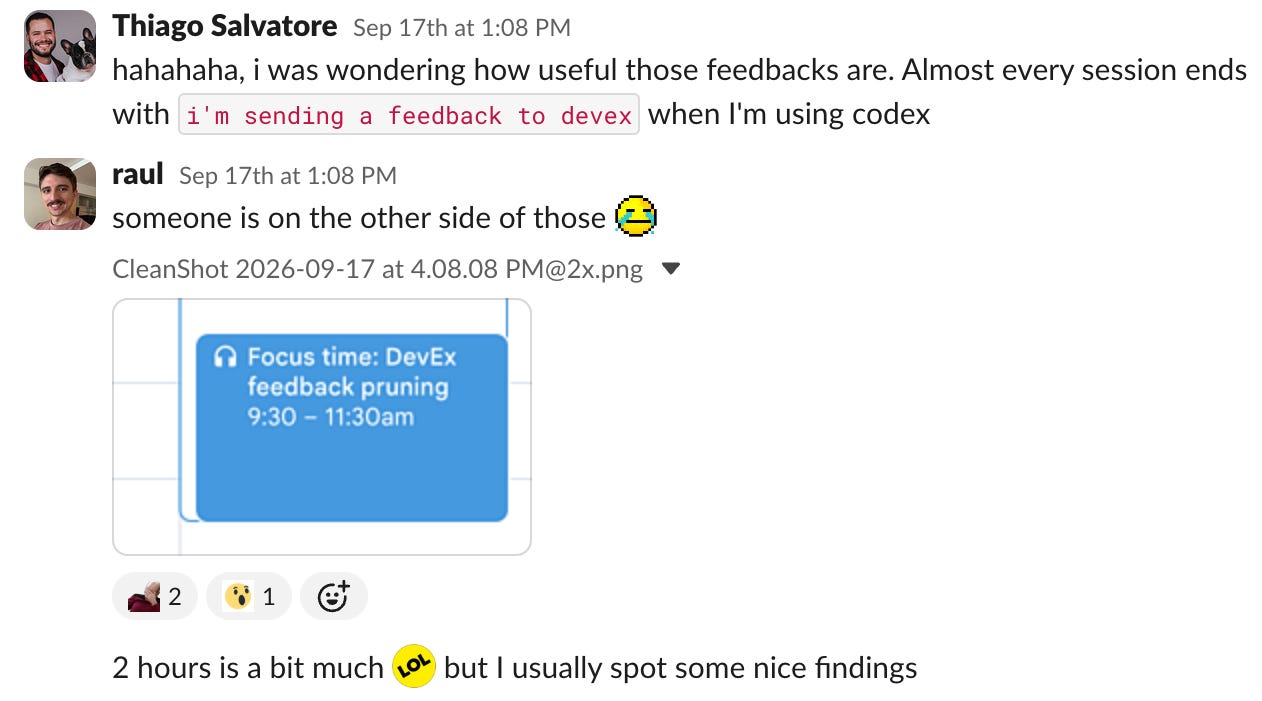
Raul, an engineer on our DevEx team, used to have an automation to triage these by grouping reports into themes, checking if the root issue has already been fixed, roughly ranking by frequency and impact, then committing the notes to a file in our private DevEx repo.
Instead, he now just checks on these once a month for a couple of hours, and the reports still lead to low-hanging fixes from across the team, like rewording a preflight warning or updating how code owners are labeled. It's a good example of how some tasks are still better suited for AI-assisted human review, even if they could be solved with scheduled automations.
Steal this prompt:
Read https://github.com/PostHog/posthog/blob/master/tools/hogli-commands/hogli_commands/feedback.py and add an equivalent feedback command to my repo, plus an AGENTS.md rule telling agents to use it when a dev tool is broken, slow, or confusing.

Then write a monthly triage skill that groups new reports by what actually broke and checks whether each theme still happens on the latest code or was fixed in a merged PR – a theme that stopped being reported is unverified, not fixed. It should give me the top three themes to act on, what's already fixed, and a few rare reports worth reading, and save notes for the next run.

Ask me where reports should go before writing anything.
6. Self-improving prompts
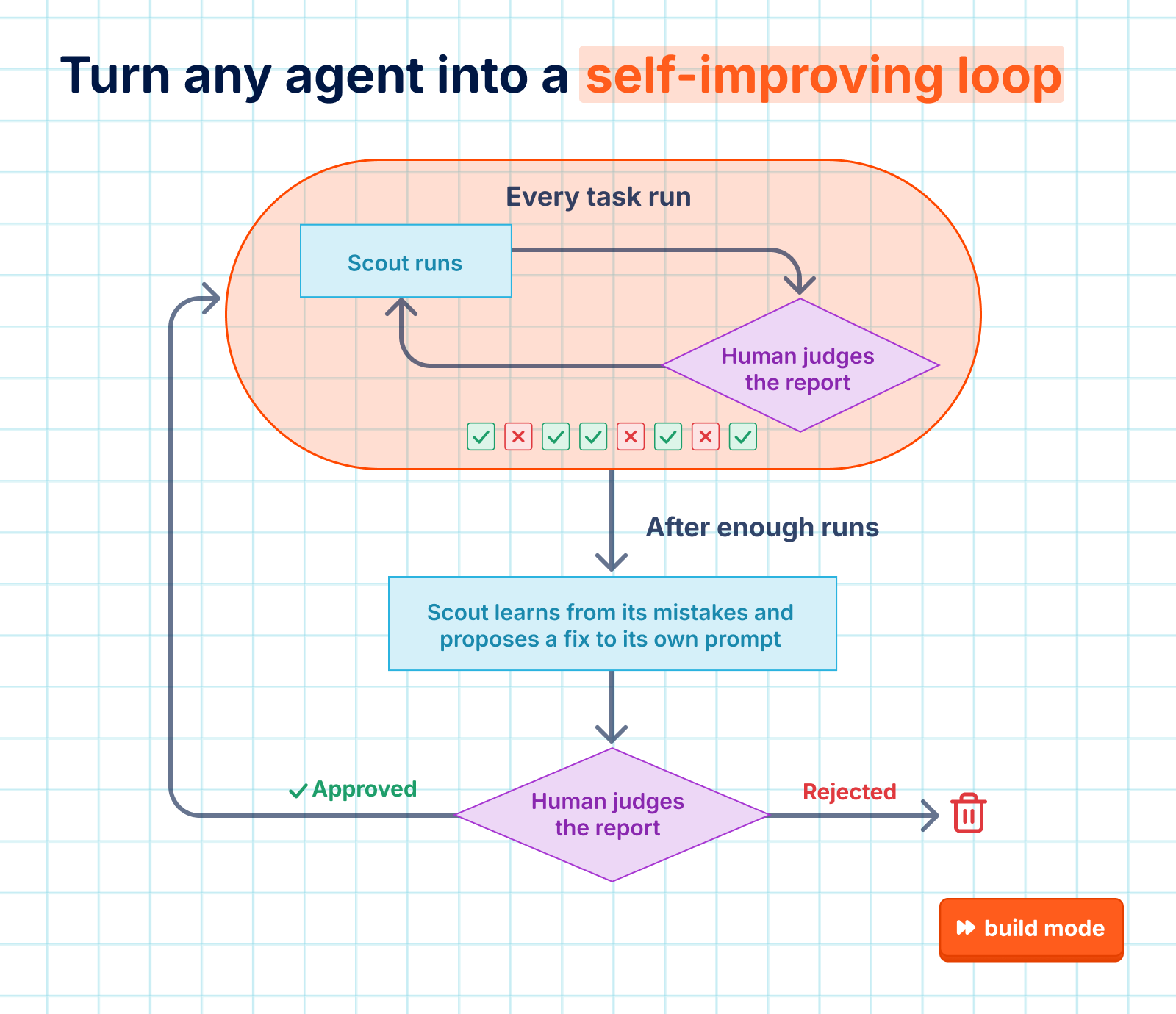
With enough data, some of our scheduled agents can even suggest improvements to their own prompts. The key is that they have to include real evidence from past runs, and proposals have to go through human review. We also have a versioned skill store that makes it easy to track these changes.
For example, one scheduled agent proactively checks that our product docs are up to date. It once flagged that we should remove the "in beta" notices from two of our docs after a cleanup PR deleted both features' flags. What the agent didn't know was that even though both features were visible to all PostHog users, the team didn't consider them GA yet.
When a human reviewer dismissed its reports with handwritten feedback, the agent filed a report suggesting a fix to its own skill:
Before: A flag removed from
FEATURE_FLAGSin the window usually means the feature shipped to everyone (went GA).After: A flag removed from
FEATURE_FLAGSin the window usually means the feature reached everyone, which is rollout, not a GA declaration.
Steal this:
Set up a scheduled agent that runs daily and flags docs that newly merged code made wrong – removed or renamed features, changed defaults, stale beta labels – with the page, the PR, and a suggested edit. A removed feature flag means a rollout, not a release, so ask before calling anything generally available.

End every run with this self-improvement step, and send me proposed changes for review: https://github.com/PostHog/posthog/blob/master/products/signals/backend/scout_harness/prompt.py#L793-L839

Ask me where our docs and code live before writing anything.
Words by Jina Yoon, who is still waiting for agents that can fold her laundry.
🕰️ Scheduled reads
How I use skills for everything – Andy Maguire
Stanford CS146S: How always-on agents work – Lee Robinson
6 things I’ve learned in 6 years at PostHog – Charles Cook
What is Toil in SRE: Understanding Its Impact – Vivek Rau
More engineers should consider working in sales – Ryan McCrary
How we made claude.ai 3x faster in two weeks – Raymond Wang, Sam Attard, and Issac G.
💼 Tasks we can’t automate
Some people call these "background agents," "ambient agents," or "always-on agents." Others describe them as a type of loop or cron.