


Three months ago, everyone was tokenmaxxing. Then, reality struck.
Fable limits made the average developer increasingly aware of their spend, and giants like Facebook, Microsoft, and Shopify turned away and curbed the practice.
Now everyone is (rightly) obsessed with tokenminning: optimizing token spend and limits for fun and profit. This post is your guide to squeezing the most out of your dollars and context.
1. Learn how to track token spend
The first step in tokenminning is knowing how much you spend. If we didn’t track this, we never would have known:
A product’s LLM costs doubling from $5k to $10k in a day wasn’t a regression. A launch caused a workflow to run 4x more, but the cost per run actually fell from $1.8 to $1.4.
The Claude Code SDK in PostHog Desktop uses Haiku extensively (3-5 calls per Opus call) revealing an opportunity for us to swap it with a cheaper, self-hosted model in the future.
RTK wasn’t saving tokens on bash commands as expected because it wasn’t being used properly by Claude. A fix cut 13% in bash token usage and a PR is open to ship it to everyone.
To catch and optimize spend like this, you need to monitor:
How much you use on flat-rate subscriptions like Claude Code which are constrained by context windows and rate limits, rather than costs. The /usage command is the big one here, but so are ccusage, quota widgets like ccseva, and monitoring of LLM spend through gateways.
How much your team uses automations, Slack apps, and scheduled agents. Many have monitoring built-in, but you need to consolidate them to prevent blind spots.
How much customers use AI-powered features. Being efficient here impacts what products you can build, how much you can charge for them, and how much you can grow. AI Observability is a big help.
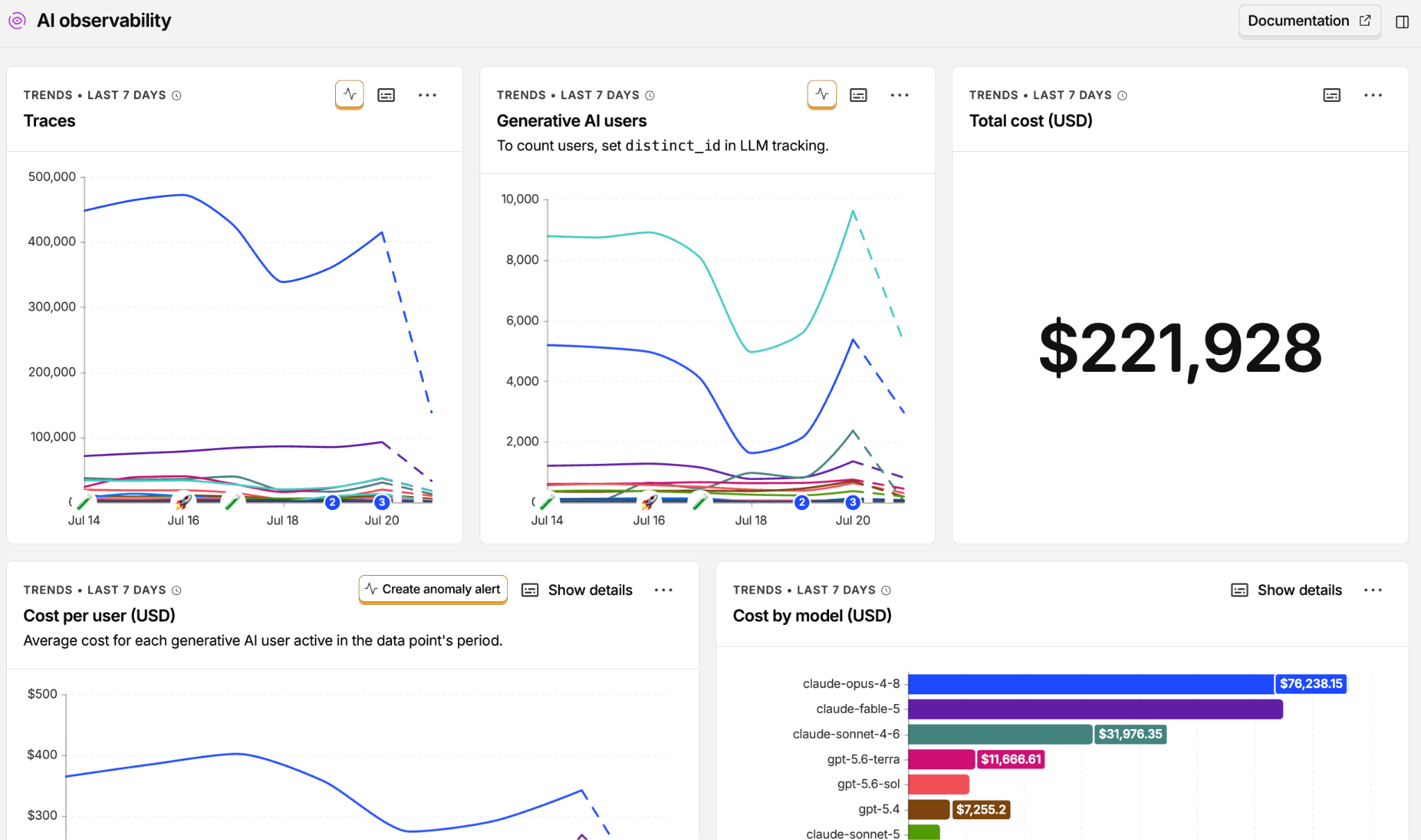
Teams almost always have a gap in at least one of these places. This limits the details you have about what workflows, features, and use cases are using the most tokens. Your monthly bill from Anthropic won’t tell you this.
However you find your baseline costs, it needs to go hand-in-hand with tracking accuracy, success rates, and usage because it defeats the purpose of tokenminning if the changes make your workflows or products worse. Evals and product analytics are critical to monitoring this.
Tracking quality also reveals failures like bad queries, repeated retries, and agent runs that produce nothing. Fixing errors like these prevents token spend that never should have been spent in the first place.
2. Optimize your AGENTS.md
Your AGENTS.md is like a backpack you carry wherever you go. Its goal is to save your agent tokens when they read it. To best do that, it should include:
Discovery shortcuts. Facts an agent will find eventually, expensively. For example, details on our bespoke, unguessable hogli CLI for testing, linting, and building.
Undiscoverable intent. Direction of travel, taste, and policy. Like preferring SeaweedFS over MinIO (because the latter is being removed) or that we ban hooks.
Landmines. Things agents get confidently wrong and only learn from CI or prod like workflow backward compatibility breaking CI repeatedly or dispatch caps on stacked PRs.
It shouldn't include:
Lint-enforced content, like using camelCase for TypeScript or American English
Obvious model-defaults, like following existing patterns in the codebase and writing tests
One ls or grep answers, like directory trees, the list of packages, 200 line reference components
Docs meant for humans, like mission statements or contributing etiquette
An AGENTS.md file is definitely worth having though. One study showed “the presence of AGENTS.md is associated with a lower median runtime (Δ 28.64%) and reduced output token consumption (Δ 16.58%), while maintaining a comparable task completion behavior.” That’s tokenminning if I ever heard it.
3. Audit your MCP servers
Although MCP tool definitions and schemas don't load into the system prompt anymore, fetching one can still blow up a session's context window. For example:
The official Atlassian MCP server consumes roughly 10k tokens for Jira and Confluence tools alone.
The official GitHub MCP server exposes 94 tools and consumes roughly 17.6k tokens.
Cloudflare’s native MCP with full schemas include 2,594 tools with a cost of 1,170,523 tokens (but Code Mode fits it in 1,069).
With every tool exposed, PostHog’s MCP server used to have 183 tools and 113,843 tokens (it doesn’t anymore).
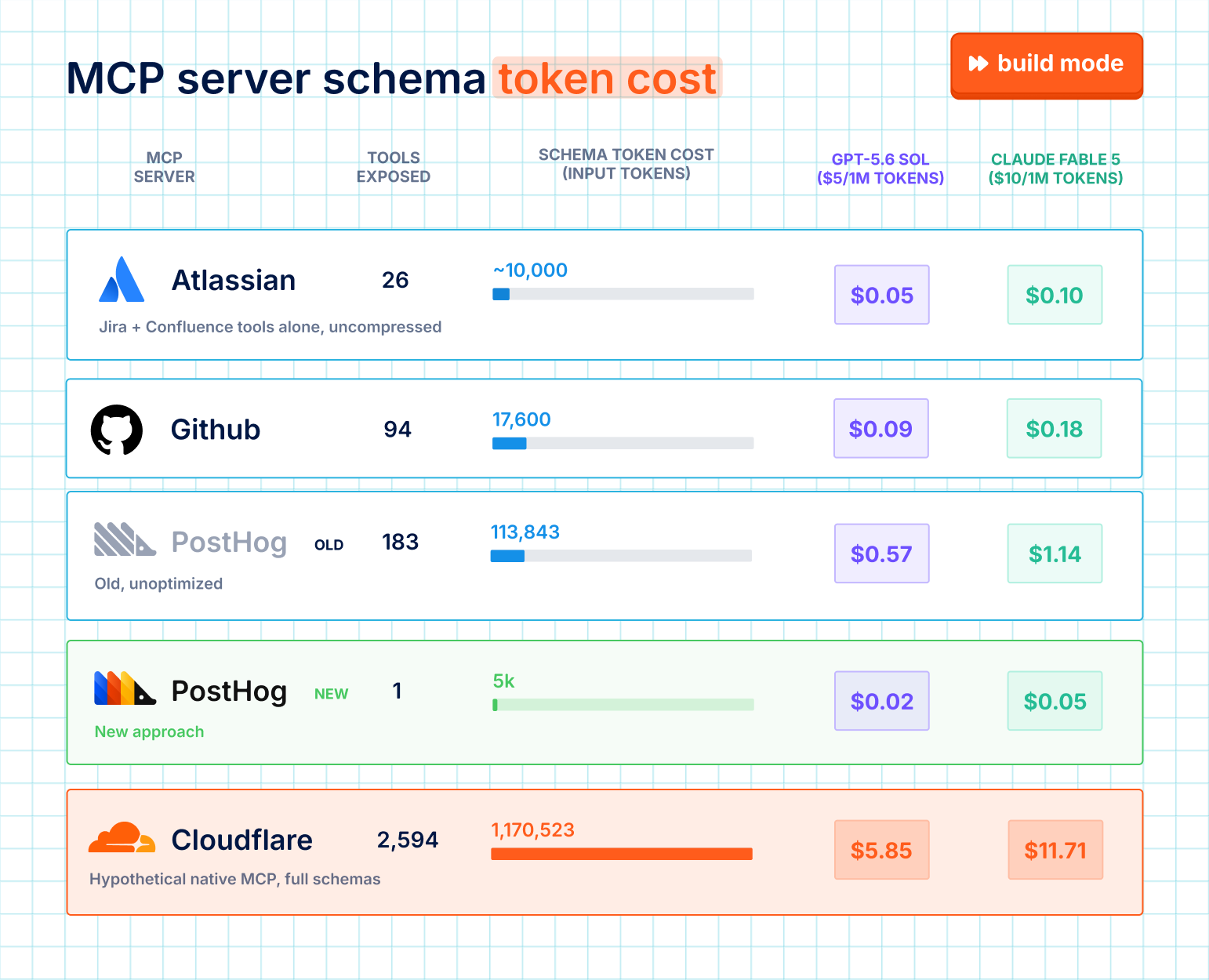
For developers, you need to know what MCP servers are costing you. A CLI like the gh for GitHub or posthog-cli can often be more efficient and there are tools like RTK that further optimize CLI commands.
For MCP server providers, you cannot just expose every endpoint as a tool. Tool descriptions can occupy a huge amount of the context window. Platforms like Cursor and OpenAI limit tool count anyways.
Let us be a lesson. As a company with a formerly hefty MCP server, here’s what we’ve done to optimize ours:
A single
exectool. This brought our MCP server down from 113,843 tokens to 5,000.Progressive schema exploration. Tools like
query-trends,dashboards, andexecute-sqlhad input schemas that exceeded the 16k token limits individually, so we summarize them instead.Connect time scoping.
mcp.posthog.com/mcp?features=flags,dashboardsmounts two features instead of forty.?tools=dashboard-getpins one tool. Most users only use a handful of our tools, our MCP server can match this behavior.
4. Learn what caching is and why it matters
Vincent on our Wizard & Docs team once audited our AI install wizard and found it embezzling tokens. The trivial conclude step cost $1.47 and he thought it was the agent holding onto context up until that point. A fresh query() call cut accumulated input 89%. You’d expect this to cut costs, right?
Wrong. Every new call has to rebuild the whole cache, which costs more. Cache writes cost much more than cache reads, so clearing context only pays off if you save 12x tokens for every one it forces you to rewrite. Cached tokens are 10x cheaper in dollars per token than regular ones, and sometimes even faster too.
This is why understanding caching is so important. ngrok and earendil have great guides if you want all the details, but the most relevant parts in practice are:
Caches are per-model, so beware of fallbacks. If a conversation falls back to another model in a session, it will instantly double charge you.
The cache is keyed on the literal bytes of your prompt in render order: tools, system, messages. Put stable tokens first and volatile content last. Anything that changes per request belongs after the last cache breakpoint, not interpolated into the system prompt.
Subagents are great for context isolation, but don’t share its parent’s prefix, so every one you spawn pays the full cache-write price. The parent’s cache can also run out waiting for children to return.
Anthropic cached writes cost 1.25x normal input on the 5-minute cache and 2x on the hour. Reads cost 0.1x. This means you need one read to earn back the 5-minute write, but the hour cache write needs two reads.
Check
cache_read_input_tokensin the response. If it’s zero across requests that should share a prefix, something is silently invalidating.
5. Choose the best model for the job
First, do you need a model at all? The most token-efficient call is the one you don't make. Linting, regex, a SQL query, or a script are free, fast, and can't hallucinate.
If you do, start by understanding the model landscape: which ones are available and what do they excel at? This often isn’t obvious.
For example, on paper, Sonnet is cheaper than Opus, but in a test on our self-driving capabilities, we found that Sonnet 5 was 20% cheaper than Opus 4.5, not 2.5x as advertised, because Sonnet spends 1.7x turns/tokens.
We used Sonnet 4.5 on early agents not because it was the smartest but because it was the best blend of quality, speed, and cost. The blend is still the primary way we evaluate models, iterating by giving a variety of models the latest data and using LLM-as-judge to pick what model makes sense.
Typically this means:
Cheap models for one-shot jobs with simple outputs. We use claude-haiku-4-5 for titles and Slack app classifiers, gpt-4.1-mini for MCP intent generation and survey summaries.
Frontier models where the reasoning is the product. claude-opus-4-8 is the default for PostHog Desktop and query materialization fixes. gpt-5.6-luna classifies Slack app tasks and reasons about which model to use for them.
Gemini where it’s structurally the right tool, not just cheaper. We use gemini-3-flash-preview for Replay Vision because it actually watches the video (others don’t) and gemini-2.5-flash-lite-preview for summarizing huge volumes of LLM traces because it needs a cheap model with a huge context window.
A router can provide a gateway to many models, which is helpful for testing and optimizing. Using multiple models, and routing to different ones per request, is the current meta with some companies saving 60-75% on workloads.
The final boss of “choosing the best model for the job” is training your own. We’re doing this for session replays as it’s a specific format where even a basic custom model can better give signal to whether a replay is interesting or not, for cheaper.
6. Separate working memory from long-term memory
Agents don’t need to remember everything you’ve ever done, like what you had for breakfast this morning.
Even though Claude and ChatGPT have auto memory features, it is still useful to build a mental model of how and when agents make memories. This way you aren’t stuck with wasteful memories and you can context engineer a token-saving memory system when using models directly if you need.
There are two types of memories:
Working memory: Session-limited, in-context, compressible.
Long-term memory: Persisted, project-level, selectively retrieved.
All memories start in working memory. It is only with some rule that they get promoted to long-term. For us, that is: Is it actionable for a future run?
Both the “future” and “actionable” parts of this rule are relevant. We follow these in our Scout scratchpad by creating memories that are “dated, names the entity ID, gives a clear conditional, bounded by a precise time anchor.” An example looks like this:
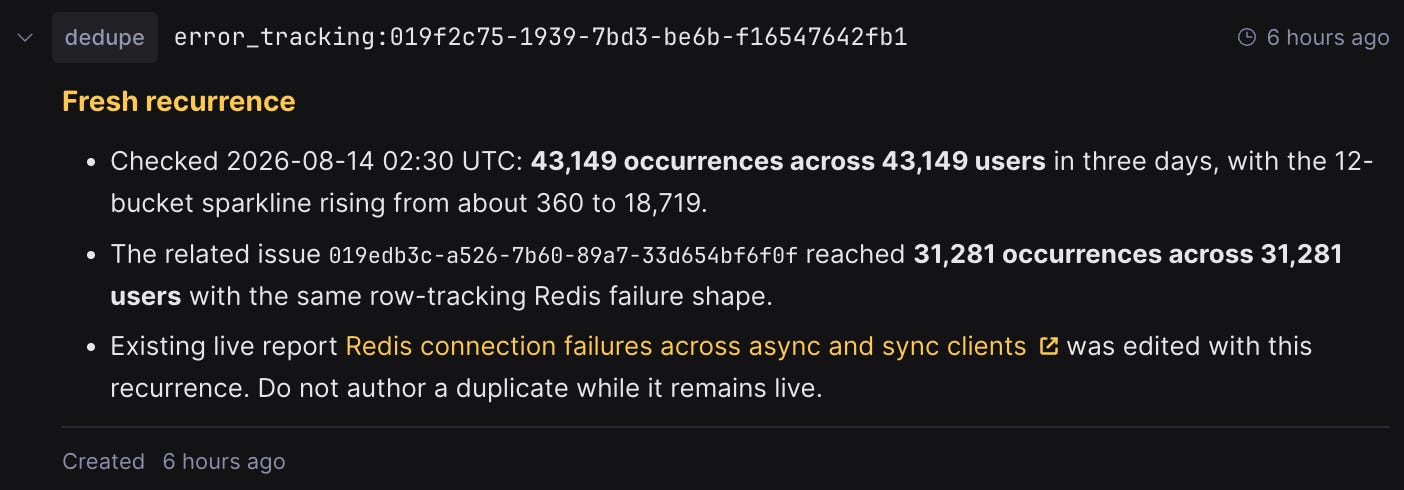
The key dedupe:error_tracking:19f… is structured so when agents are researching another error, they only need a single text search to find error_tracking related memories. The content then gives instructions on what to do if it’s the same row-tracking Redis failure again: skip authoring a new report.
A bad memory might have a key of note-1 and content of all the context. This requires the agent to scan much more content to find the relevant memory and then interpret the content to decide if it’s actionable.
7. Know when not to tokenmin
There is a lot of stupid advice about tokenminning, like spending your time optimizing over single words. I've seen influencers say you shouldn't say "please" or "thank you" because those are wasted tokens.
Optimizing a prompt you use a handful of times isn’t worth it. Neither is a workflow that doesn’t use many tokens. Our AI installation wizard is an example of the shape that’s worth optimizing for. It runs hundreds of times per day and costs ~$7 each time. Look at per-run cost to find waste and run count to decide if it’s worth changing.
Don’t optimize something whose shape isn’t settled. Prototypes get rewritten. Tuning caching and model selection on an in-progress workflow just means doing it again later.
If you’re an individual developer on a flat-rate plan, dollars are probably not your constraint. Focus on your context window and what’s loaded every session (AGENTS.md, MCP), not shaving prompts.
Done right, tokenminning helps you tokenmaxx on the right things.
Words by Ian Vanagas, who will still use his tokens to say "thank you" no matter what the haters say.
💼 Jobs at PostHog
📚 Good reads worth spending time with
I bribe customers to talk to me - Jake Sciotto
How to understand AI agent performance in your product - Will Wearing
The Tokenminning Manifesto - Rob May
AI usage patterns in software teams - Tim Qi
The Shape of Things to Come - Steve Yegge
Great read brother